"Where AI Agents Transform Ideas into Production-Ready Code"
</div>
---
📊 **System Overview**
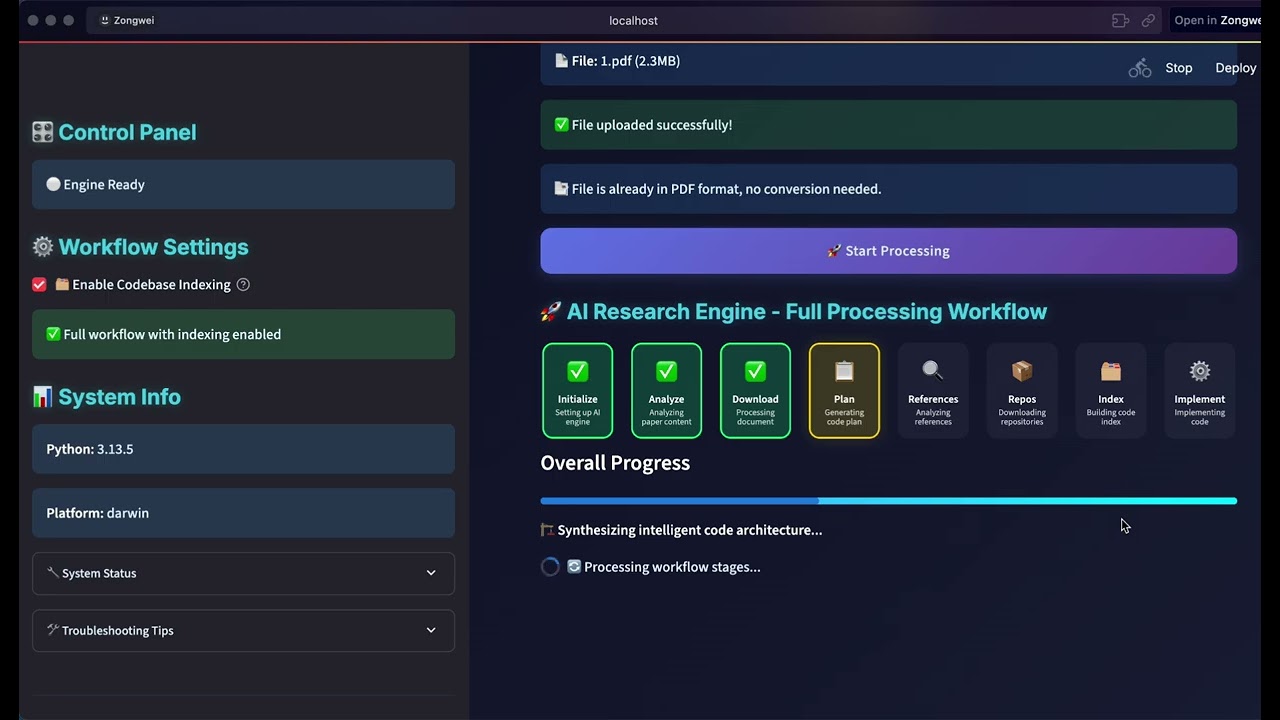
DeepCode is an AI-powered development platform that automates code generation and implementation tasks. Our multi-agent system handles the complexity of translating requirements into functional, well-structured code, allowing you to focus on innovation rather than implementation details.
🎯 Technical Capabilities:
🧬 Research-to-Production Pipeline<br> Multi-modal document analysis engine that extracts algorithmic logic and mathematical models from academic papers. Generates optimized implementations with proper data structures while preserving computational complexity characteristics.
🪄 Natural Language Code Synthesis<br> Context-aware code generation using fine-tuned language models trained on curated code repositories. Maintains architectural consistency across modules while supporting multiple programming languages and frameworks.
⚡ Automated Prototyping Engine<br> Intelligent scaffolding system generating complete application structures including database schemas, API endpoints, and frontend components. Uses dependency analysis to ensure scalable architecture from initial generation.
💎 Quality Assurance Automation<br> Integrated static analysis with automated unit test generation and documentation synthesis. Employs AST analysis for code correctness and property-based testing for comprehensive coverage.
🔮 CodeRAG Integration System<br> Advanced retrieval-augmented generation combining semantic vector embeddings with graph-based dependency analysis. Automatically discovers optimal libraries and implementation patterns from large-scale code corpus.
---
🚀 Key Features
<br/>
🚀 Paper2Code
Automated Implementation of Complex Algorithms
Effortlessly converts complex algorithms from research papers into high-quality, production-ready code, accelerating algorithm reproduction.
Generates efficient, scalable, and feature-rich back-end code from simple text inputs, streamlining server-side development.
</td> </tr> </table>
<br/>
---
🔄 **Process Intelligence Features**
🎯 Adaptive Flow
Dynamic agent selection based on input complexity
🧠 Smart Coordination
Intelligent task distribution and parallel processing
🔍 Context Awareness
Deep understanding through CodeRAG integration
⚡ Quality Assurance
Automated testing and validation throughout
</div>
---
📋 **Prerequisites**
Before installing DeepCode, ensure you have the following:
Requirement
Version
Purpose
**Python**
3.9+
Core runtime
**Node.js**
18+
New UI frontend
**npm**
8+
Package management
```bash
Install frontend dependencies
npm install --prefix new_ui/frontend
##### 🐍 **Using Traditional pip**
bash git clone https://github.com/HKUDS/DeepCode.git cd DeepCode/
pip install -r requirements.txt
Install frontend dependencies
npm install --prefix new_ui/frontend
##### 🧪 **Editable install (lets `deepcode` always run THIS checkout)**

If you want the global `deepcode` command to launch the source tree you are
hacking on, install the project in editable mode after the steps above:
bash pip install -e . ```
This registers a deepcode-hku package (current version 1.2.0) and exposes the deepcode CLI entry point. Any local code change is picked up immediately on next launch — no reinstall needed.
If you maintain multiple DeepCode checkouts, only one of them can own the deepcode command at a time (the most recent pip install -e . wins). Reinstall in the checkout you currently want to be active.
#### 🔧 **Development Installation (From Source)**

<details>
<summary><strong>📂 Click to expand development installation options</strong></summary>

##### 🔥 **Using UV (Recommended for Development)**
bash git clone https://github.com/HKUDS/DeepCode.git cd DeepCode/
curl -LsSf https://astral.sh/uv/install.sh | sh uv venv --python=3.13 source .venv/bin/activate # On Windows: .venv\Scripts\activate uv pip install -r requirements.txt
🔧 **Step 2: Configuration**
The following configuration applies to all installation methods (pip, UV, source, and Docker). Everything lives in one file: deepcode_config.json (single source of truth, nanobot-style).
🔑 API Keys (required)
Edit deepcode_config.json and fill in at least one provider key. Inline strings work, and ${ENV_VAR} references are resolved at load time.
Any OpenAI-compatible endpoint is supported by overriding apiBase on the matching provider entry. Then set the model name on the agents block (using provider/model slugs):
OpenRouter model ids must use the exact id returned by OpenRouter, for example z-ai/glm-5.1, anthropic/claude-sonnet-4.5, or google/gemini-2.5-pro. In the new UI, open Settings → OpenRouter Models to search the live OpenRouter catalog and update the Default, Planning, and Implementation models without editing this file manually. Saving from the UI reloads the runtime for newly started workflows.
🔐 Never commit deepcode_config.json. It is already in .gitignore.
</details>
🤖 LLM Provider (optional)
The provider is inferred from the model slug (openai/..., anthropic/..., gemini/..., etc.). To force a specific backend, set agents.defaults.provider:
> Replace the path with the actual global `node_modules` path from step 2.

</details>

<details>
<summary><strong>🔍 Web Search Configuration</strong></summary>

DeepCode performs web content retrieval through the built-in `fetch` MCP server (no API key required) and reads local files via `filesystem`. The auxiliary search server defaults to `filesystem`:
💡 Tip: To plug in another search backend, add it under tools.mcpServers in deepcode_config.json and set tools.defaultSearchServer to its name.
</details>
🤖 nanobot Integration (Feishu Chatbot)
Chat with DeepCode from Feishu — powered by nanobot.
flowchart LR
subgraph Clients["💬 Chat Platforms"]
direction TB
F["Feishu WebSocket"]
T["Telegram Polling"]
D["Discord Gateway"]
end
subgraph Gateway["🐈 nanobot Gateway"]
direction TB
A["Agent Loop LLM + Tool Calls"]
end
subgraph Engine["🧠 DeepCode Engine"]
direction TB
P2C["Paper → Code"]
C2C["Chat → Code"]
TRK["Task Tracking"]
end
F & T & D <-->|"messages"| A
A -->|"HTTP API"| P2C & C2C & TRK
A -.->|"LLM API"| LLM["☁️ OpenRouter"]
style Clients fill:#1a1a2e,stroke:#00d9ff,color:#fff
style Gateway fill:#1a1a2e,stroke:#4ecdc4,color:#fff
style Engine fill:#1a1a2e,stroke:#ff6b6b,color:#fff
style LLM fill:#1a1a2e,stroke:#9b59b6,color:#fff
</div>
✦
Both services run inside the same Docker Compose network. Prerequisites: Docker Desktop + OpenRouter API Key (get one) + Feishu App.
---
🔧 **Troubleshooting**
<details> <summary><strong>❓ Common Issues & Solutions</strong></summary>
Problem
Cause
Fix
Docker build fails with tsc: not found
Corrupted build cache
docker builder prune -f then rebuild with --no-cache
error during connect / cannot find the file / Docker is installed but not running
Docker Desktop not running
Either start Docker Desktop, **or** skip Docker entirely with deepcode --local
Frontend blank page
Corrupted node_modules
cd new_ui/frontend && rm -rf node_modules && npm install
ERR_CONNECTION_REFUSED
Wrong port / backend not running
Docker: http://localhost:8000. Local (--local): frontend http://localhost:5173, backend http://localhost:8000
npm install → Could not read package.json
Wrong directory
Use npm install --prefix new_ui/frontend
Windows: MCP servers not working
Need absolute paths
See [Windows MCP Configuration](#-step-2-configuration) above
Windows: UnicodeEncodeError: 'gbk' codec can't encode... on launch
Default GBK console can't render emoji in startup banner
Set UTF-8 first: set PYTHONIOENCODING=utf-8 && set PYTHONUTF8=1 (cmd) or $env:PYTHONIOENCODING="utf-8"; $env:PYTHONUTF8="1" (PowerShell)
Windows: code-implementation stage hangs / produces a -p directory
LLM emitted mkdir -p ... and cmd.exe treated -p as a folder name
Already fixed in tools/command_executor.py — common Unix commands (mkdir -p, touch, rm -rf, cp -r, mv) are now executed natively via pathlib/shutil, no shell needed
name 'LoopDetector' is not defined during code implementation
Missing import in workflow modules
Already fixed — LoopDetector and ProgressTracker are now imported from utils.loop_detector in both workflows/code_implementation_workflow.py and workflows/code_implementation_workflow_index.py
</details>
---
🇨🇳 中文文档镜像
AI 翻译2026-05-25
英文原文章节由系统翻译为中文摘要,便于快速理解。完整原文见上方 "📑 README 深度解析"。
📌 简介
DeepCode 是一个强大的自动化开发工具,旨在将复杂的科研论文(Research Papers)直接转化为可运行的代码。通过集成先进的 AI 能力,它能够理解学术逻辑并实现高效的代码转换,帮助开发者从理论研究快速跨越到工程实现阶段。